What is Salesforce’s Einstein AI?
Living in the AI era, where autonomous agents have revolutionized the activities we can perform, it is only normal for it to also be part of the #1 CRM in the world. Einstein in SFMC is capable of providing better Journey management, distributing communications at the most likely time a person would open their inbox, categorizing consumers, automatically tagging content, and much more. This is not just simple coding, but Digital Divination —granting us the ability to peer into the void of engagement data and predict the future to be everywhere at once and create multilingual comms for every creature in this realm to understand.
To activate and later on configure the AI in the instance go to:
Setup » Platform Tools » Einstein
Einstein is a licensed product. It requires to be acquired with an Account Executive if it is not included by default in your instance.
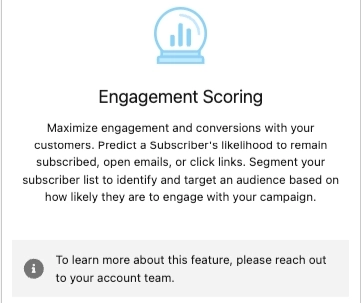
When it isn’t licensed, a disclaimer is displayed in each functionality with next steps to learn more about provided features:
Opening the Gates to the Realm of Einstein AI
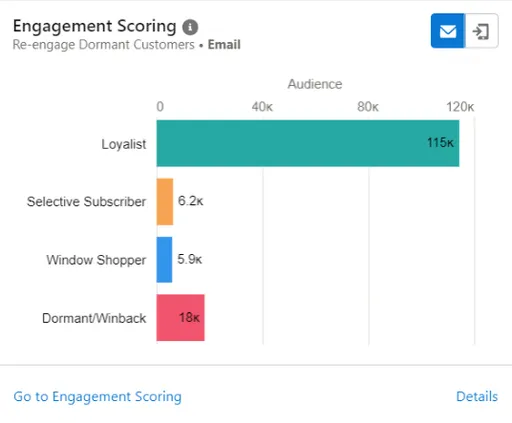
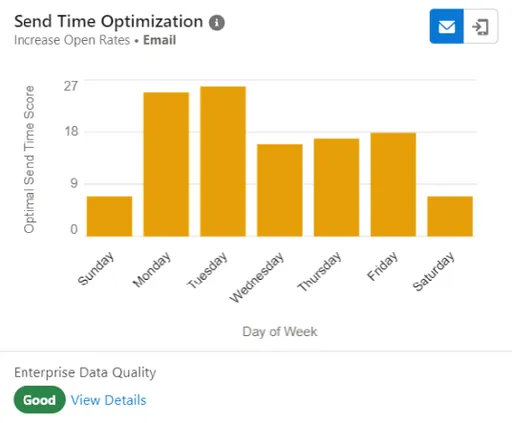
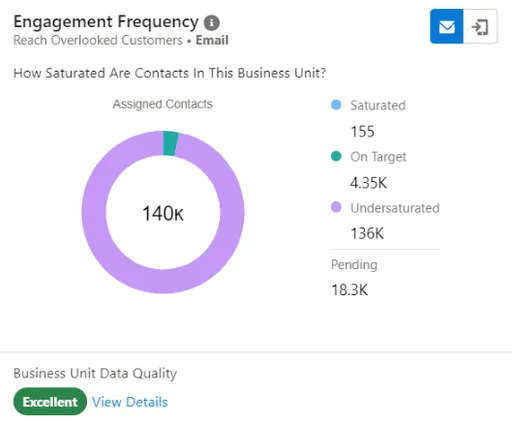
Within the Einstein module there is a feature called 'Overview', which is a general central view of all the different offered modules. If any widget in that view is interacted with, a redirection to their detailed module occurs. Additionally, more information on each widget is displayed if you click on ‘Details’.
Available for Email
Available for Push
Usable as a Split activity (Flow Control) within Journey Builder
This incredible Scrutinizing Crystal Ball peers into the souls of your mortal subscribers, and uses a science-bound magic ritual of machine learning to assign them Personas (engagement predictive scores), providing for each of your consumers the likelihood to engage with our email or push communications. These generated scores are stored in accessible Data Extensions an can be used for the below:
- Monitor engaged subscribers health
- Filter to identify and target predicted likelihood to engage with email and push campaigns
- Segmentation or creation of best-performing lookalikes (Advertising)
- Leverage analytics to gain insights on subscriber Persona changes on trends
These generated scores Data Extensions are called:
- 01
✉️ Einstein_MC_Predictive_Scores
- 02
📱 Einstein_MC_MobilePush_Scores
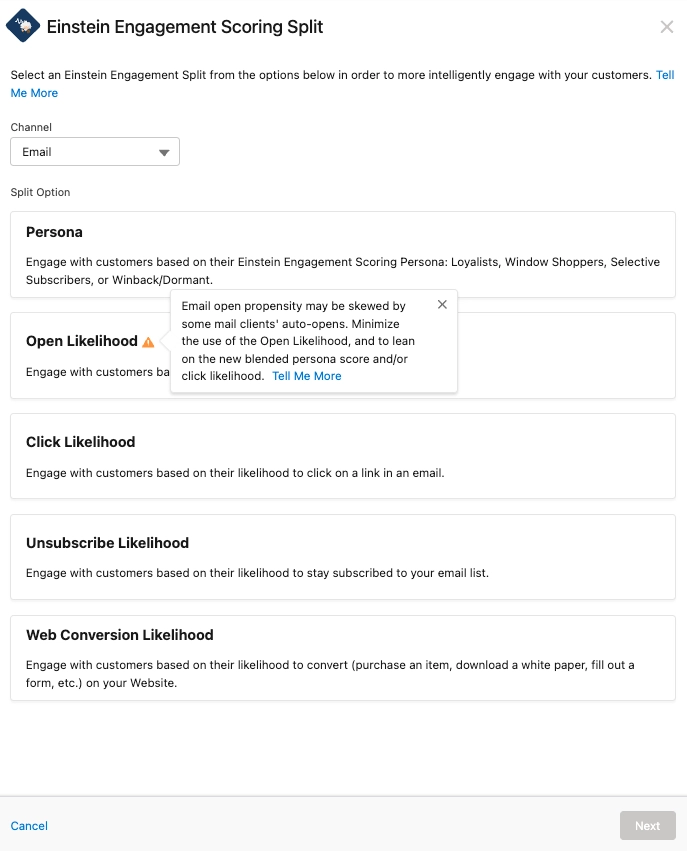
When the activity is used in Journey Builder, we have the possibility to select how to manage the decisions —to split based on the channel we are using for the communication (email / push).
✉️ For Email comms:
- Persona
- Open
- Click
- Unsubscribe or
- Web Conversion Likelihood
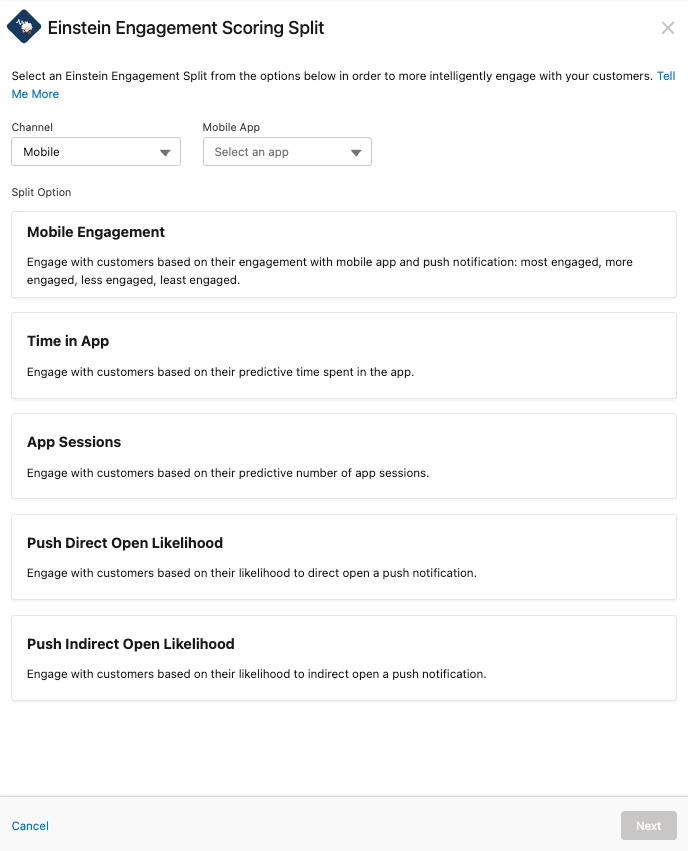
📲 For Push notifications:
- Mobile Engagement
- Time in App
- App Sessions
- Push Direct Open Likelihood
- Push Indirect Open Likelihood
Even though the Persona split allows for options with different names, all available options operate under the same likelihood conditions —Most, More, Less and Least:
- Most Likely/Engaged…
- More Likely/Engaged…
- Less Likely/Engaged…
- Least Likely/Engaged…
For the site to be tracked, deploy a “Collect Tracking Script”
The Mirror of Anomalies for Messaging Insights
Available for Email
Available for Push
As we will see with other Einstein features, these are highly focused to be used in or accompanying Journey Builder. Messaging Insights is not the exception, as it generates alerts that warn you of any abnormal changes in the performance of your sent emails. It may also recommend specific adjustments to improve Journeys.

Einstein supervises the below email engagement rates:
- Open
- Click
- Unsubscribe
Abnormal changes can vary. e.g., a Journey had a lower or higher open or click rate is considered for the notifications; as well as .
Sample messages:
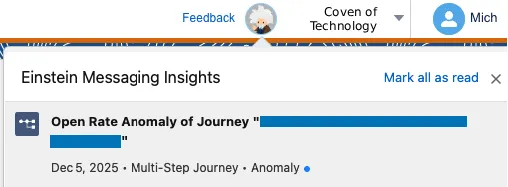
High Click Rate for Email ‘New Season’➚ 28.34% higher than expectedOctober 31, 2024
Open Rate Anomaly of Push ‘{User}’➘ 70.52% lower than expectedNovember 3, 2025
Even though these insights are helpful for guidance, they do not always reflect the current reality of practices as they are still provided by an AI.
Chronomancy for the Inbox with Send Time Optimization
📧Available for Email
📲Available for Push
Usable as an Optimization activity (Flow Control) within Journey Builder
The most commonly known and used Einstein feature. Also referred to as “STO” (due to its acronym), this Time Magic is your best friend to deliver emails or push notifications when it is most likely human souls will engage with our communications.
"e.g., Miss Hahn wakes up, has breakfast and she may open it before or after her cup of tea, but she religiously checks her inbox in the morning before commuting to work."
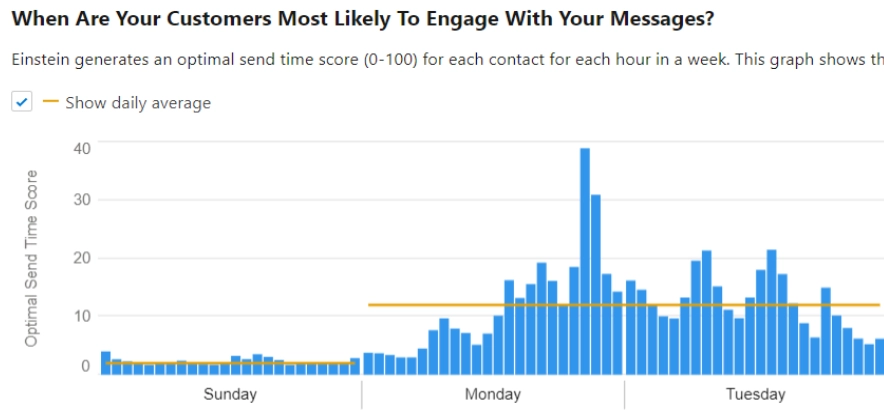
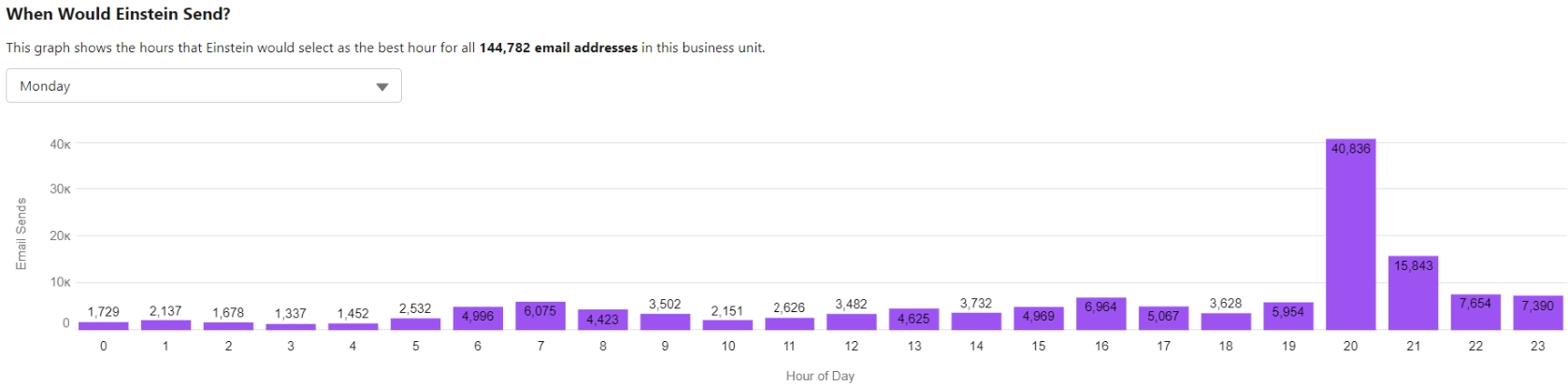
With this Time Magic, Einstein analyzes in a Business Unit the past 90 days of engagement data SFMC retrieves about subscribers’ interactions, and due to their engagement with the comm it is predicted with a science-bound magic ritual of machine learning the exact hour when the platform sends the messages, boosting key performance indicators (KPIs)..
Transactional / Test Sends are excluded from the analysis.
As with all of the above-and-below-mentioned features, data is organized and displayed within the Einstein module in SFMC. For STO there are several helpful ones, such as:
- Data Quality
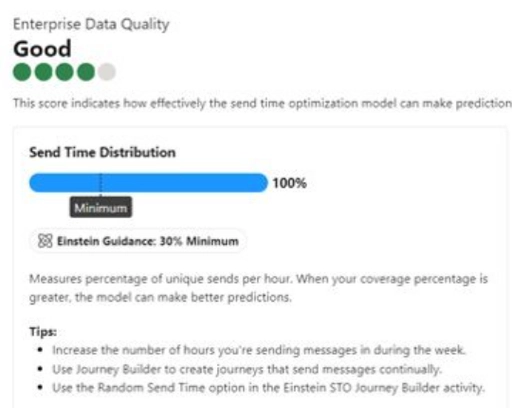
- When Are Your Customers Most Likely To Engage?
- When Would Einstein Send?
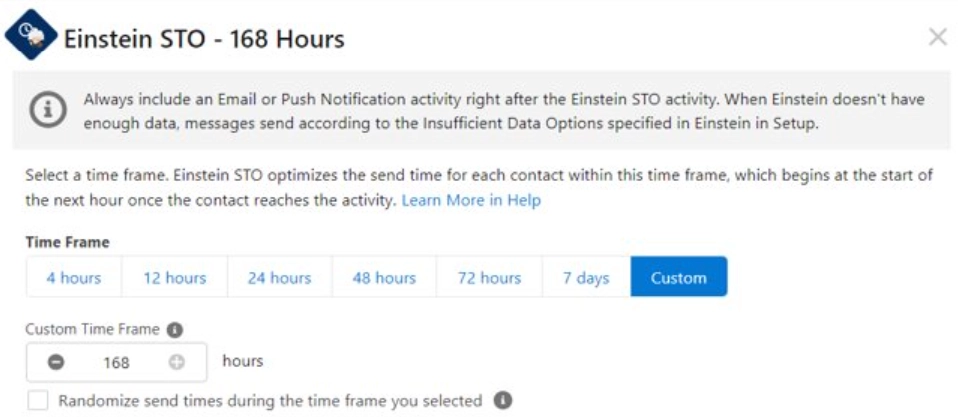
Additionally, there is a minimum and a maximum window for Einstein to do its magic, ranging from 4 to 168 hours (7 days).
If the historical information for a consumer is not sufficient, there is a configuration in the platform setup to decide what is done in those cases.
Setup » Platform Tools » Einstein
The Scales of Balance for Engagement Frequency
📧Available for Email
📲Available for Push
Usable as a Split activity (Flow Control) within Journey Builder
The great Scales of Balance categorize souls by their tolerance for volume, identifying who is over or under saturated with messages, or who can be sent more communications, preventing saturation before they receive too many.
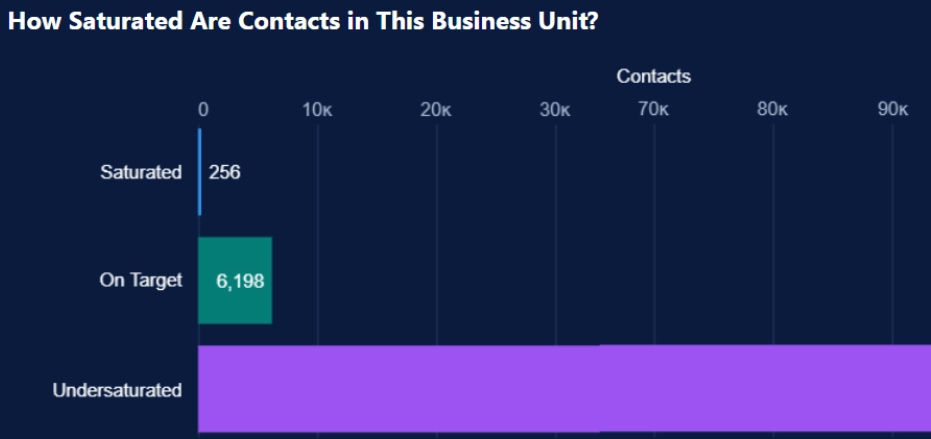
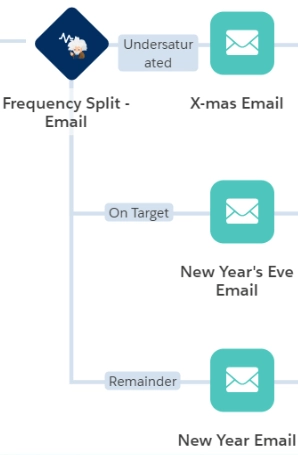
As with other Einstein incantations, this one uses a real-time Frequency Split in Journey Builder to route souls based on their saturation status, maintaining harmony in the realm.
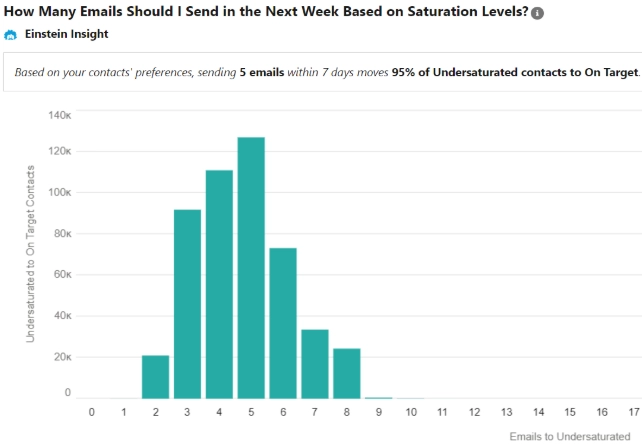
The mythical Scales of Balance only weigh volume and not intent or desire, in other words: how frequent you’re broadcasting communications to your subscribers’ souls.
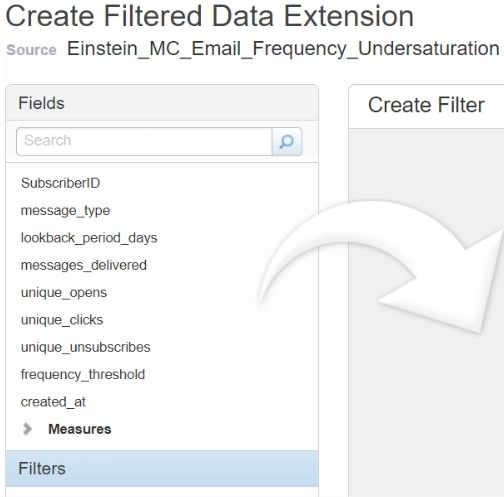
Based on available insights, Einstein Frequency data (Over and Under saturation only) can be channeled to create Data Extensions
These generated Data Extensions are called:
- Einstein_MC_Email_Frequency_Undersaturation
- Einstein_MC_Email_Frequency_Oversaturation
The Scales of Balance require you to initially broadcast to your subscribers at least 5 communications over a 28-day period [using a Commercial Send Classification] to properly model for engagement frequency.
Open metrics may be less reliable due to subscribers’ mail auto-open privacy settings.
The Lexicon of Enchantment on Copy Insights
📧Available for Email
📲Available for Push
This linguistic analysis artifact dissects the spells layered on your Subject lines to reveal which emotional tones, words, phrases and symbols truly compel your audience, predicting performance against your past sent messages.
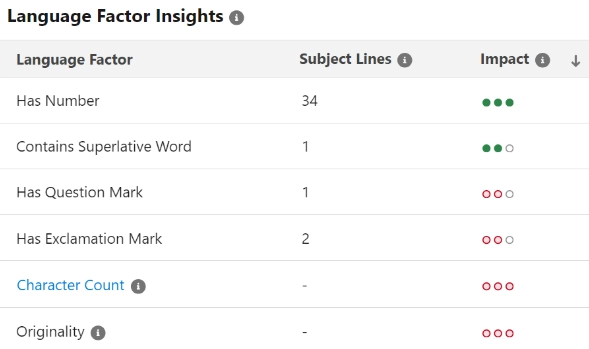
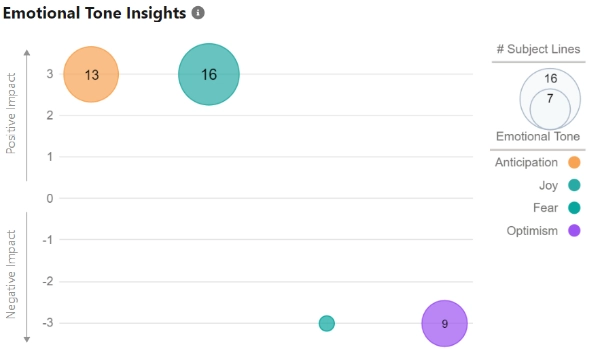
The Lexicon of Enchantment reviews up to 90 days of email engagement data [excluding Test and Transactional sends] and returns insights on how to enchant with more impact your Subject lines to increase interactions.
- DE
- ENG
- FR
- JP
- PT
- ES
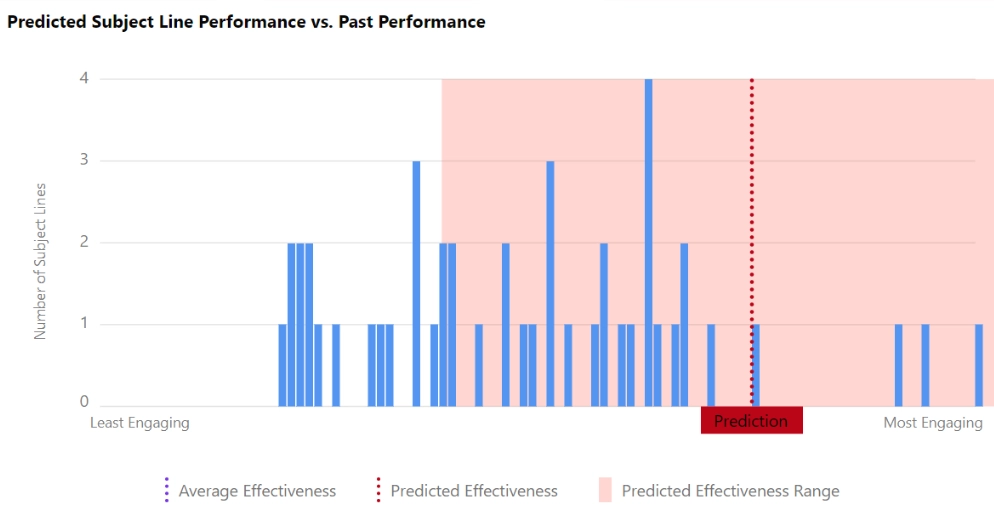
Test a Subject line before sending (Interpret Test Results)
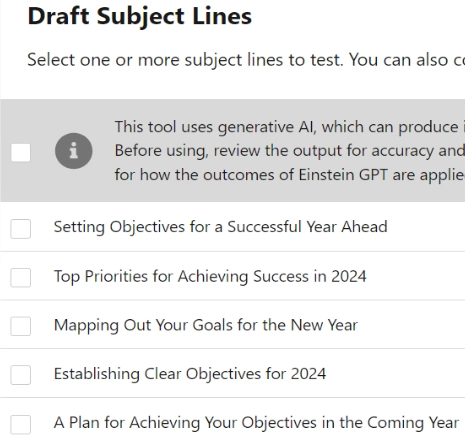
If you thought that was it, Einstein is such an achievement in the science of magic world, that it also has the capability to generate content! Subject Lines and Body text can be crafted by providing initial prompts on what would be the expected result.
Even though these insights are helpful for guidance, they do not always reflect the current reality of practices as they are still provided by an AI.
Real-Time Shapeshifting with Content Selection
📧Available for Email
Could you imagine if an incantation could work automatically and shapeshift according to the user’s soul? The Shapeshifting Grimoire allows Einstein to choose the most alluring content or offer (from a catalogue of images) for a subscriber at the precise millisecond the email is opened.
To cast a ritual from the Shapeshifting Grimoire, there are a diverse variety of assets that must be meticulously organized:
📚 Asset Classes
These define different pools of content for Einstein to select.
📑 Asset Attributes
Manage asset fields and values that are valid for creating or uploading assets.
📑 Profile Attributes
Manage profile fields and values that are valid when syncing profiles from a Data Extension.
👪 Existing Consumer Profile
Einstein will learn more about your subscriber by syncing Data Extensions.
⚖️ Content Selection Rules
Define custom rules regarding displaying time of assets and exclusion rules.
📁 Fallback Assets
Select an alternate image for each pool of content to display when no matching content is found for a subscriber.
If a subscriber ignores chosen images three times (a.k.a. Content Fatigue), Einstein will seamlessly drop that illusion and try new content from the related pool.
This functionality has incredible potential, and limited use however. Due to the dynamic nature of marketing teams, it is very difficult to configure and maintain elements and rules that last over time.
📩 Email Recommendations
📧Available for Email
🌐 Web Recommendations
📬Available for Web
Analogous to the previous legendary artifacts, these two cousin Suggestion Relics deliver the next best content or product in either an email or the business’ webpage. Very much alike the previously mentioned Shapeshifting Grimoire, these relics use a pool of images from Einstein Content Selection. When a comm is sent to your subscribers’ souls, the emails are delivered as a pre-built image-and-link pair, and are activated when a user engages with the message.
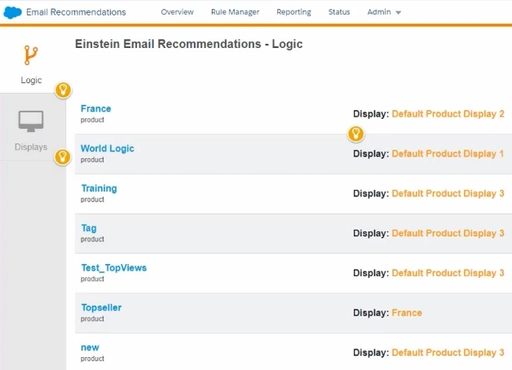
The logic, content and scenarios are generated/stored in advance (to ensure the content is instantly available without sacrificing performance when a message is opened), and triggered immediately before consumers see the recommendation.
Each recommendation is an individual image. If you want to send four (4) recommendations to users, four (4) HTML/Einstein blocks are required in your email communication.
Thumbnails are activated when a user engages with the website. The best practice is to leverage a JSON file for delivering web recommendations due to its flexibility for transforming data as it is needed.
The All-Seeing Eye for Content Tagging
📧Available for Email
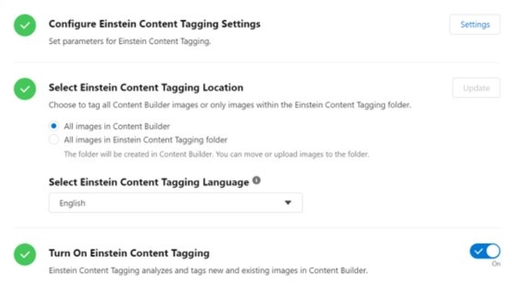
Channeling through Einstein the powers of Google Vision AI, this feature automatically identifies and tags imagery within Content Builder, sort of an All-Seeing Eye. These searchable tags contain a prefix that you can define, as well as the maximum tags an image can contain, and the confidence level that Einstein assigns.
⛔ Artifact Limits
- A maximum of 25 tags can be applied per image. These are tagged on existing JPG, JPEG and PNG <10MB files.
- The mythical Scales of All-Seeing Eye analyzes and tags images every 24 hours. Assigned Tags can be deleted/disabled/modified only after turning-off Content Tagging.
- If Deleting Tags, these can take up to 24 hours to be removed.
If Tags are deleted and the functionality is re-enabled before 24 hours have passed, all images are retagged using the defined settings.

Even though these insights are helpful for guidance, they do not always reflect the current reality of assets as they are still provided by an AI.
- e.g., the image used in the example displays the flag for Chile 🇨🇱, but Google’s Vision AI misinterpreted it as the flag of the United States of America 🇺🇸.
Use Case Exercise
Scenario: Your Headmaster is looking to send one of the most important events to all members of the council, and would like to use predicted behavior on which time suits best for sending these messages. What feature would you recommend to use?
Scenario: The Supreme Witch requires to maintain a standard send of owl-messages to all professors and distinguished alumni, however, she doesn’t want to overcommunicate and saturate them through this method. What feature would you recommend to use?
Scenario: Samuel, your potion expert is writing a new newspaper article to share a few insights on a research he’s carrying out, but the titles used in these publications are not catchy nor impactful to his audience. What feature would you recommend Samuel to use?
Scenario: Irene, the expert enchantress, wants to know how long a user has spent reading her recent newsletter. She would like to have this information shown in a magical dashboard that updates automatically every hour. What feature would you recommend to use?
What is being requested is not an out-of-the-box functionality. A custom development must be built to achieve this inquiry.
To Sum-Up
Einstein in SFMC is a licensed AI suite designed to optimize engagement and help marketers make smarter decisions. If you have the tool available in your SFMC org., give it a try and start adding it to your campaigns to improve your overall delivery strategy. There are certainly more than a few features you can use in every of your processes!